Comparison
Best 3D camera apps for iPhone, by how they get the depth.
There’s no single best one: 3D camera apps get their depth in different ways. Here are five, ours included, with the others described from their own App Store pages.
How each app gets the depth
“3D” means different things in different apps.
| How it gets the depth | Ways to see it | |
|---|---|---|
| StereoCam (ours) | Fires the main and Ultra Wide cameras at the same moment, for photos and video. | Wiggle, cross-eye, parallel, red-cyan, a flat picture, and spatial copies for Apple Vision Pro. |
| PopPic | Its App Store page says it captures depth along with the photo. | Explore the photo by tilting your phone; depth effects and motion. |
| Camera 3D Pro | Its App Store page describes taking the left and right shots with one gesture: press, pull, release. | Anaglyph, parallel, cross-eyed, wigglegram and VR headsets. |
| 140mm | Its App Store page describes taking several photos while you slide the phone from left to right. | Wigglegrams, exported as a GIF, video or Live Photo. |
| BiCamera | Its App Store page describes 3D spatial photos and videos captured with one tap. | Red-blue, parallel and cross-eye, with export for Vision Pro. |
We made StereoCam, so read this with that in mind. The other apps are described only from their own App Store pages, checked on 12 November 2026; check those pages for current features, supported iPhones and prices. PopPic, Camera 3D Pro, 140mm and BiCamera are trademarks of their owners; StereoCam is not affiliated with them.
Questions to ask before you pick
- Both views at once, or one after another? Firing two cameras together takes both views at the same moment. Moving the phone between shots takes them one after another.
- Which iPhones? StereoCam needs iPhone 11 or later with an Ultra Wide camera. Check each app’s page for its own list.
- How will people see it? A wiggle shows the depth to anyone. Cross-eye and parallel take a little practice, red-cyan needs 3D glasses, and spatial copies play on Apple Vision Pro.
- Photos, video or both? StereoCam also films side-by-side 3D video with sound, at up to 1080p.
- Account and data? StereoCam needs no account, and its App Store label says Data Not Collected. Check each app’s own privacy label.
Where StereoCam fits
If you want both views taken at the same moment.
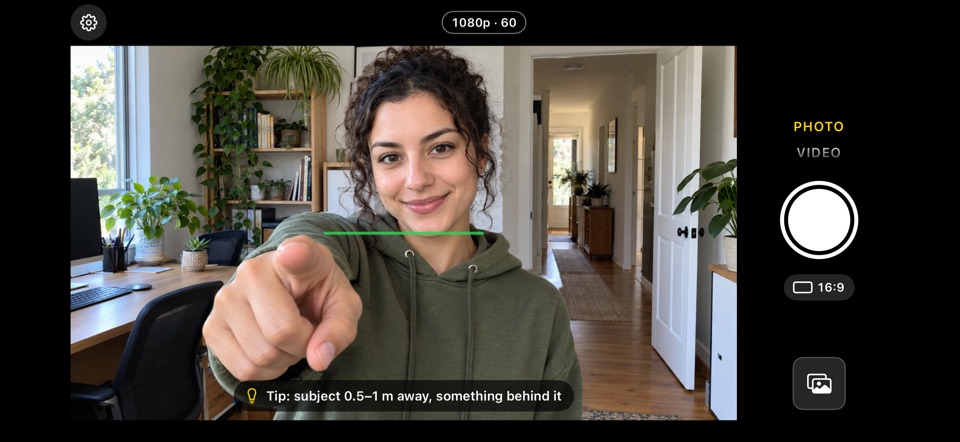
Hold your iPhone sideways, keep the level line green and shoot: both rear cameras fire at once, and the two pictures are lined up on the phone. Shots open in Cross-eye view, with Wiggle, Parallel, Red-cyan and Single one tap away, and you can share a wiggle video, a GIF or a 9:16 cross-eye challenge. Your first photos and videos are free.
Its limits: it needs an iPhone with an Ultra Wide camera (not iPhone SE, 16e, 17e or Air), it doesn’t make depth from a single picture, and the 3D gallery, the views and sharing come with StereoCam Pro.
Questions
What is the best 3D camera app for iPhone?
It depends on how you want the depth. StereoCam fires both rear cameras at the same moment. PopPic’s App Store page describes depth you explore by tilting the phone, and Camera 3D Pro and 140mm describe taking the views one after another.
Is there a 3D camera app that uses both iPhone cameras?
StereoCam is one: it fires the main and Ultra Wide cameras at the same moment, on iPhone 11 or later with an Ultra Wide camera.
Is there a free 3D camera app for iPhone?
StereoCam’s first photos and videos are free; then StereoCam Pro is Monthly, Yearly or Lifetime. PopPic’s App Store page says you can take, view and share as many 3D photos as you like without upgrading. For the others, check their App Store pages.
Do 3D camera apps work on every iPhone?
Not all of them. StereoCam needs an iPhone with an Ultra Wide camera: iPhone 11 or later, with iOS 16 or later, not iPhone SE, iPhone 16e, iPhone 17e or iPhone Air. Other apps list theirs on their App Store pages.
More guides
Take 3D photos on iPhone
Hold it sideways, keep the level line green and shoot: both rear cameras fire at once.
Wigglegram app for iPhone
Wigglegrams from both rear cameras at the same moment, shared as a video or GIF.
See 3D cross-eyed
The finger trick: two dots become three, and the middle picture snaps into 3D.
Record 3D video on iPhone
Side-by-side 3D video with sound, up to 1080p, from both rear cameras at once.
Nimslo-style photos on iPhone
The wiggle look from your iPhone’s two rear cameras: no film, nothing to develop.
Try 3D from both cameras at once
Get StereoCam, hold your iPhone sideways and shoot. Your first photos and videos are free.
iPhone 11 or later · iOS 16+ · No account, no ads