Alternative
Nimslo-style wigglegrams on your iPhone.
Searching for a digital Nimslo? If what you want is the wiggle, StereoCam makes it with your iPhone’s two rear cameras, fired at the same moment.
The wiggle, from your phone
Two pictures taken at the same moment, a few centimetres apart, like your eyes.
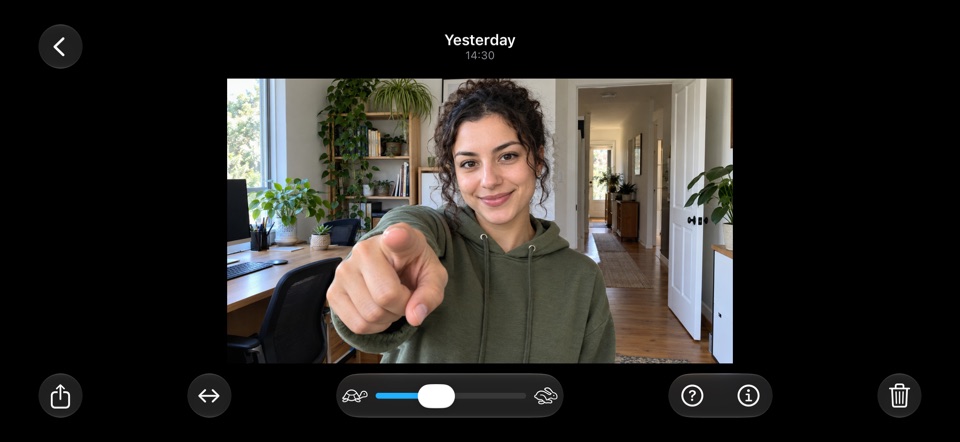
A wiggle rocks between the two views, so the world around your subject moves in 3D while the subject stays still. StereoCam takes both views at once with your iPhone’s main and Ultra Wide cameras, lines them up on the phone and puts the screen plane on your subject by itself.
Share it as a wiggle video or as a GIF.
Nimslo is a trademark of its owner; StereoCam is not affiliated.
What StereoCam is, and isn’t
- An iPhone app, not a film camera. No film and nothing to develop.
- Two views per shot. Each wiggle rocks between the two pictures from your iPhone’s two rear cameras.
- It can’t turn film scans into wiggles. StereoCam makes 3D from its own two cameras, and brings in only spatial photos and videos from Photos (iOS 18).
- Needs two rear cameras. iPhone 11 or later with an Ultra Wide camera and iOS 16 or later; not iPhone SE, 16e, 17e or Air.
- Wiggles come with StereoCam Pro. Your first photos or videos are free and saved to Photos as side-by-side 3D pictures.
Shoot one
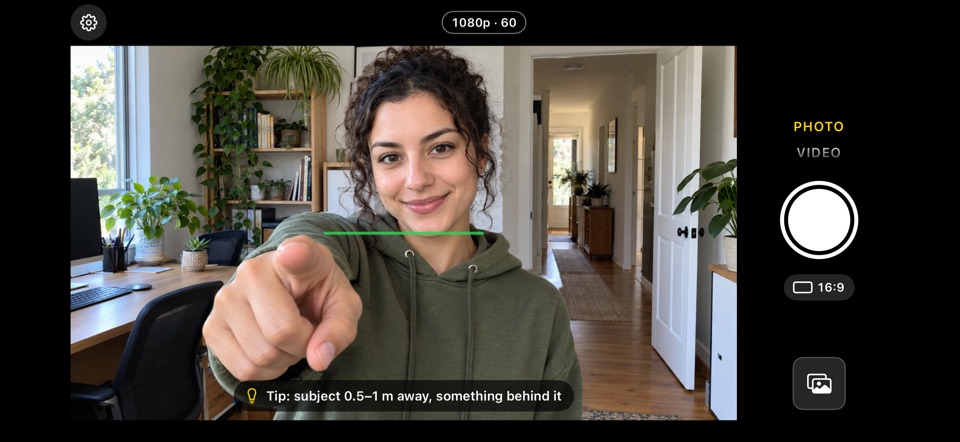
- Hold your iPhone sideways and keep the level line green.
- Frame your subject 0.5 to 1 metre away, with something behind it, and tap the shutter.
- Tap the thumbnail and switch to Wiggle. Set the speed with the tortoise–hare slider.
- Tap Share and pick Wiggle video, or Wiggle GIF under More.
Questions
Is there an app like Nimslo for iPhone?
StereoCam isn’t connected to Nimslo, but if you want wigglegrams, it makes them with your iPhone’s two rear cameras fired at the same moment. It needs iPhone 11 or later with an Ultra Wide camera.
How is a wigglegram made?
From two pictures of the same moment, a few centimetres apart. StereoCam takes both at once with your iPhone’s main and Ultra Wide cameras, lines them up and rocks between them, so the subject stays still while the world around it moves in 3D.
Can StereoCam turn my film scans into wigglegrams?
No. It makes 3D from its own two cameras, and brings in only spatial photos and videos from Photos (iOS 18).
Which iPhones work?
An iPhone with an Ultra Wide camera: iPhone 11 or later, with iOS 16 or later. Not iPhone SE, iPhone 16e, iPhone 17e or iPhone Air, which have one rear camera.
More guides
Take 3D photos on iPhone
Hold it sideways, keep the level line green and shoot: both rear cameras fire at once.
Wigglegram app for iPhone
Wigglegrams from both rear cameras at the same moment, shared as a video or GIF.
See 3D cross-eyed
The finger trick: two dots become three, and the middle picture snaps into 3D.
Record 3D video on iPhone
Side-by-side 3D video with sound, up to 1080p, from both rear cameras at once.
3D camera apps for iPhone
Five 3D camera apps for iPhone, sorted by how they get the depth.
Shoot your first wiggle
Get StereoCam, hold your iPhone sideways and point it at something an arm’s length away. Your first photos and videos are free.
iPhone 11 or later · iOS 16+ · No account, no ads